Costs & Pricing
All AI generation costs are charged by fal.ai directly to your account. modelBridge does not process, mark up, or add any fees. It surfaces fal.ai’s pricing inside Premiere Pro so you can see what a generation will cost before you run it.
The problem modelBridge solves
Section titled “The problem modelBridge solves”On fal.ai’s model pages, pricing is presented as a rate — dollars per second, per megapixel, or per token. That’s technically precise, but it leaves you to do the math yourself. When you’re about to generate a 10-second 1080p video with audio enabled, you’d need to find the right rate, check whether audio adds a surcharge, look up the resolution tier, and multiply it all out. Most people skip that step and generate blind.
modelBridge does the calculation for you, in real time, directly in Premiere Pro — similar to the cost preview you’d see in fal.ai’s Sandbox, but applied to your actual settings across the fal.ai catalog. Change resolution, duration, or toggle audio, and the estimate updates instantly. No tab-switching, no manual math, no guesswork.
But not all pricing data is equal. Some models have complete, verified pricing. Others expose only a base rate. Some publish nothing at all. Instead of hiding this complexity, modelBridge is transparent about what it knows and how confident each estimate is. Every cost badge carries a confidence tier so you always understand the basis for the number you’re seeing.
Confidence tiers
Section titled “Confidence tiers”modelBridge uses a small set of labels to communicate exactly how each displayed cost was arrived at. Two are post-generation (anchored to provider-reported usage, or computed by formula); the rest are pre-generation (previews of varying precision). Before you generate, every badge renders in the same muted grey — the label carries the meaning, not the colour; in the Billing tab colour separates the tiers.
| Badge | Label | When | Source | What it means |
|---|---|---|---|---|
$X.XX · Metered | Metered | Post-generation | fal.ai’s units × fal.ai’s rate | Measured. fal.ai reported the units this run used, priced at fal.ai’s own rate for them — modelBridge’s multiplication, not your fal.ai invoice. |
$X.XX · Calculated | Calculated | Post-generation | the forecast formula | Not a measurement. fal.ai reported no usage for this run, or usage in a unit modelBridge can’t price at fal.ai’s own rate — so this is the same forecast formula, applied to the settings that ran, kept as the best figure available — not your fal.ai invoice. |
Charged, amount unknown | Charged, amount unknown | Post-generation | fal.ai’s units, no rate | fal.ai charged for this run and reported it in a unit with no rate modelBridge can apply. The count is shown; the amount isn’t available. It counts as spend. The total is then marked ≥. |
$X.XX · Estimated | Estimated | Pre-generation | fal.ai’s published price, per parameter | A forecast from fal.ai’s published price for this model, applied to your settings. It isn’t a quote: fal.ai publishes a simplified rate rather than the formula behind it, and says prices can change. fal.ai forecasts too — their own workflow view labels its figure “Est.” After the run, Billing shows a measured amount when fal.ai reports usage modelBridge can price at fal.ai’s own rate; otherwise this same formula stands, labelled Calculated. Updates live as you change settings. |
≈$X.XX · Learned | Learned | Pre-generation | Your own past runs | Priced from your own previous runs of this model at these settings — usually closer than a published rate, because it’s measured on your account instead of derived from fal.ai’s simplified one. Still a forecast: the final count comes from the finished output. Expires after 60 days of inactivity to stay current with provider pricing changes. |
$X.XX / 1K tokens · Rate | Rate | Pre-generation | fal.ai’s token rate | fal.ai bills this model per block of tokens — this is the rate, not a total. The token count is set by the finished video’s resolution and length, so it can’t be multiplied out beforehand by anyone, fal.ai included. The charge scales with the length and resolution you choose. After the run, Billing shows the measured amount when fal.ai reports the token count, and modelBridge starts pricing this model from your own metered usage. |
From $X.XX | From | Pre-generation | fal.ai’s lowest rate | A floor, not a forecast: fal.ai’s lowest rate for this model. Your settings can bill more, and modelBridge doesn’t have the full formula fal.ai applies here. As you run it, modelBridge starts pricing this model from your own metered usage. |
No price | No price | Pre-generation | Nothing to multiply | fal.ai prices this model in a unit that only exists once the run has finished — compute time, or a count fal.ai sets from the output. There is nothing to multiply beforehand. You can still generate: the run is recorded in Billing, and if fal.ai reports usage the row shows that count — priced at fal.ai’s own rate where modelBridge can apply it, otherwise as spend with no amount. Because there is no figure to check against your cost limit, no cost warning can appear before this run. |
Pre-generation labels resolve to Metered when fal.ai reports the usage units for a completed generation and modelBridge can price them at fal.ai’s own rate. Otherwise the Billing tab shows Calculated — the same forecast formula, applied to the settings that ran — or Charged, amount unknown where fal.ai reported usage in a unit with no rate modelBridge can apply. When a run was charged but its result never reached Premiere, the Billing tab shows a red badge and still counts the amount toward your total: Metered (failed run) where fal.ai reported usage, Calculated (failed run) where it reported only that the run finished.
How supplement pricing works
Section titled “How supplement pricing works”Some AI models — particularly video generation models like Kling, Veo, Seedance, and Wan — have complex pricing that depends on multiple parameters: duration, resolution, audio, and quality tier. fal.ai’s pricing API provides a base rate for these models, but it doesn’t always capture how cost changes when you toggle audio on or switch to a higher resolution. For these models, modelBridge maintains curated pricing formulas that are researched from fal.ai’s official documentation and pricing API, then reviewed regularly against those pages.
When a curated formula exists, the cost estimate responds to your settings in real time. Move the duration slider — the estimate updates. Toggle audio — it updates. Switch resolution — it updates. This is what produces the Estimated confidence tier: a forecast from fal.ai’s published price, applied per parameter to your exact settings — not a quote, because fal.ai publishes a simplified rate rather than the formula behind it.
For models without a curated formula, the estimate falls back honestly. You’ll see From $X.XX (the minimum published rate from fal.ai’s API) or, once you have run the model, Learned (based on your own usage). Both are clearly labeled so you know the basis for the number. Curated formulas are built from rates verified against fal.ai’s own published pricing — never from a placeholder; where fal.ai bills a resolution or audio tier differently from its published base rate, only a completed run reveals it, and modelBridge corrects such rates in plugin updates. Where the data isn’t sufficient for a confident number, the confidence tier tells you so.
Models that get more precise as you use them
Section titled “Models that get more precise as you use them”Models priced from fal.ai’s published rate — the From tier — get more precise as you use them. modelBridge records what each run actually consumed, and prices the model from your own usage instead: after a few runs at the same settings, from the median of their Metered costs; or after a single run, from the usage-per-second rate that run revealed. This applies to models fal.ai gives a convertible rate for; a model showing No price has no rate modelBridge can apply, so there is nothing for its usage to be multiplied by, and a model already covered by a curated formula keeps using it.
This adaptive pricing system is called modelBridge Cost Intelligence. It combines multiple data sources with learning from your own past runs to deliver the most accurate estimate available at any given moment.
How cost estimates are resolved
Section titled “How cost estimates are resolved”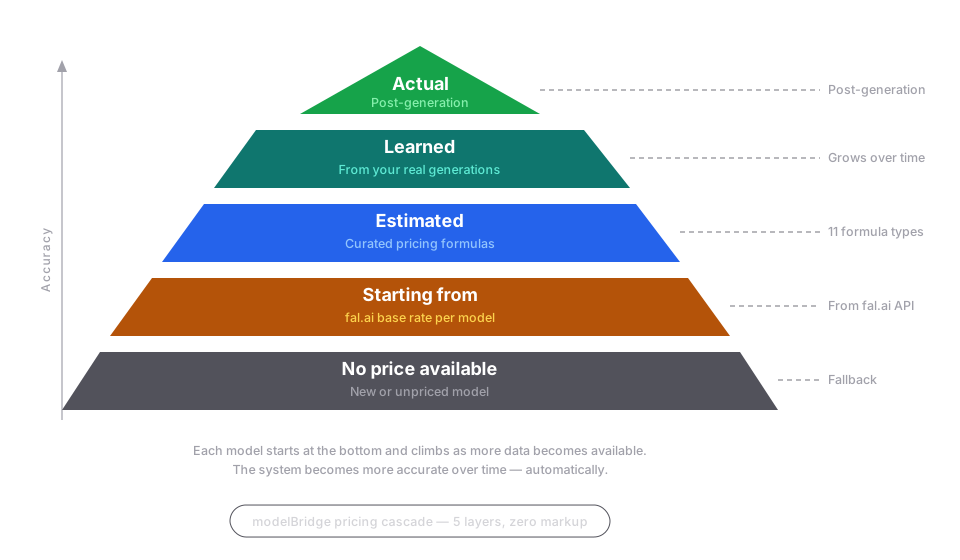
The cost badge shows the most accurate estimate available based on your usage history and the model’s pricing. modelBridge checks multiple pricing sources in priority order — from curated rates to your personal usage history to official API pricing. The estimate shown is always the most accurate source available. The badge tells you which: Estimated, Learned, From, or No price.
fal.ai’s pricing data varies between models. Some models expose detailed per-parameter rates; others provide only a flat base price; some publish nothing at all. modelBridge handles this transparently — when detailed data exists, you get a precise live estimate. When it doesn’t, you see an honest starting price or “No price.” For models with a convertible rate, the plugin learns the cost from your own metered usage as you generate.
The more you use a model, the more accurate the estimate becomes. When no data exists from any source, modelBridge shows “No price” and links to the model’s fal.ai page. It never invents a number.
What changes the price
Section titled “What changes the price”When detailed pricing data is available (Estimated tier), the cost recalculates automatically based on your current inputs:
- Length — longer output usually costs more. Depending on the model, length comes from a duration setting, the number of frames you choose, or the length of the clip you select — and a few models charge one flat price per video.
- Resolution — higher resolution tiers increase cost
- Audio — enabling audio adds a surcharge on many video models
- Number of images — generating multiple images multiplies the cost
- Quality settings — some models charge more for higher quality tiers
For models showing “From $X.XX,” the displayed price reflects fal.ai’s minimum published rate and may not account for all of these variations.
Adaptive learning
Section titled “Adaptive learning”The more you use modelBridge, the better your cost estimates become — automatically. No setup, no configuration. Just generate, and the system learns.
Behind the scenes: AI model providers don’t always expose every dimension of their pricing. For many models, the official API provides a base rate but doesn’t reflect how cost changes with resolution, audio, or quality settings. modelBridge fills this gap by observing your real billing and building personalized estimates over time.
How it works
Section titled “How it works”After each generation, fal.ai reports the usage units it consumed. modelBridge records the metered cost alongside your exact configuration — model, resolution, image size, audio state, and any other setting that moves the rate. Each unique combination is tracked separately: 1080p with audio, 720p without audio, and so on. Length is deliberately not part of that key: what is stored is a per-second rate, so a 10-second run also sharpens the estimate for an 18-second one at the same settings.
After a few generations with the same configuration, the cost badge levels up to Learned, showing an estimate derived from your Metered cost history — a stable number that reflects what you typically pay. On models where fal.ai reports usage in a unit modelBridge can convert, one completed run is enough on its own: that run reveals how much usage the configuration consumes per second, and the next estimate uses the measured figure instead of a published assumption. As you continue generating, the estimate updates with each new data point, staying current with any pricing changes on fal.ai’s side.
This means your estimates aren’t just more accurate in general — they’re more accurate for the specific configurations you actually use. A model that started with a generic “From $0.10” base rate resolves to ”≈$0.47 · Learned” for your specific 1080p-with-audio configuration — a concrete, experience-based number that no static pricing page can provide.
What makes this different from fal.ai’s pricing
Section titled “What makes this different from fal.ai’s pricing”On fal.ai’s website, finding out what a generation actually cost means navigating to Settings, then Billing, after the fact — and then remembering that number for next time. Individual model pages show rates (dollars per second, per megapixel) but don’t calculate a total for your chosen duration, resolution, and audio settings.
modelBridge removes both steps. It applies available rates and formulas to your actual settings to show a concrete total before you generate. And after you generate, it records the metered cost so the next estimate is even more precise. Pre-generation estimates inside Premiere, calibrated by your Metered cost history — that’s cost transparency designed for editors, not developers.
Design principles
Section titled “Design principles”- Exact configuration match only. Learned estimates are shown only when data exists for your exact parameter combination. Switch to an untested resolution and modelBridge falls back honestly, rather than guessing. Length is the one dimension it does scale: what is learned is a per-second rate, so a tested configuration prices any duration you choose.
- Confidence threshold. Where the learned figure is a median of past costs, several generations are needed before it appears — one data point isn’t enough for a reliable average. Where fal.ai reports usage in a unit modelBridge can convert, a single run is enough, because that run measures the quantity rather than averaging a price.
- Staleness protection. Learned estimates expire after a period without new data. This ensures estimates stay current as providers adjust pricing.
- Privacy. All learned pricing data stays local on your machine and is never uploaded. If you opt in to anonymous usage telemetry — off by default — a finished generation reports the model, how many seconds it took, and the cost estimate modelBridge holds for it, which on a learned model is derived from that local data. It is sent with an anonymous installation id and the plugin version; prompts, filenames and keys are stripped before anything leaves your machine.
Three dimensions of learning
Section titled “Three dimensions of learning”Cost estimation is one of three ways modelBridge learns from your usage:
| Dimension | What it learns | Threshold | Expiry | Indicator |
|---|---|---|---|---|
| Cost per config | Your own past runs at a configuration | One run, or a few | Expires after 60 days of inactivity | ”≈$X.XX · Learned” badge |
| Generation time | Rolling median of past durations | Three runs | Refreshed on each run | Generate button tooltip — “estimated time … (based on N previous runs)“ |
| Model availability | Schema-driven discovery via fal.ai registry | Immediate | Refreshed at startup | Model appears in catalog |
These three dimensions compound. When fal.ai releases a new model, it appears in modelBridge automatically. You generate with it, and the time estimate calibrates. After a few runs, the cost badge levels up. New models, error guidance and endpoint changes reach you automatically. Corrections to curated pricing formulas ship with plugin releases.
Understanding each tier in detail
Section titled “Understanding each tier in detail”Metered
Section titled “Metered”Anchored to real usage, recorded after your generation completed.
Badge: none. In the Billing tab a metered row shows its amount with no tier badge, and every less certain figure carries one. (A row can still carry a Dual marker in its meta line — that says the run was half of a Dual Mode pair, not anything about the amount.) On the Generate tab the cost badge settles to a muted Metered label the moment the run completes — expand the COST section to see the amount.
Measured. fal.ai reported the units this run used, priced at fal.ai’s own rate for them — modelBridge’s multiplication, not your fal.ai invoice. After each completed generation, fal.ai reports the usage units it consumed (x-fal-billable-units) and names the unit; modelBridge multiplies by fal.ai’s own rate for that unit. Where fal.ai reported no usage, or usage in a unit modelBridge cannot price at fal.ai’s rate, the run is labelled Calculated or Charged, amount unknown instead. The CSV export’s estimated_cost column carries modelBridge’s formula figure for the settings that ran, recomputed when the run completes — it is not the number you saw before clicking; the Billing row itself shows one amount, not a side-by-side comparison.
This is the strongest usage-anchored label. Pre-generation labels resolve to Metered when fal.ai reports usage units after a completed generation and modelBridge can price them at fal.ai’s own rate.
Calculated
Section titled “Calculated”Not a measurement. fal.ai reported no usage for this run, or usage in a unit modelBridge can’t price at fal.ai’s own rate — so this is the same forecast formula, applied to the settings that ran, kept as the best figure available — not your fal.ai invoice. Those entries show a Calculated badge. It counts toward your totals like any other run.
Charged, amount unknown
Section titled “Charged, amount unknown”fal.ai charged for this run and reported it in a unit with no rate modelBridge can apply. The count is shown; the amount isn’t available. It counts as spend. The row shows fal.ai’s count in place of an amount, and the total is marked ≥ because it cannot include this run.
Metered (failed run)
Section titled “Metered (failed run)”The generation was charged, but the result never reached Premiere — for example, the download or import failed after the model finished.
Badge: Metered (failed run) (red) where fal.ai reported usage units; Calculated (failed run) (red) where it reported only that the run finished.
These entries count toward your spending totals — the charge was real even though there’s nothing to show for it. A run you stopped after fal.ai had already started it may still complete and be charged; Billing checks fal.ai’s own result for such rows afterwards and settles them — with the metered amount, as a charge whose amount modelBridge cannot state, or as a run fal.ai no longer holds. The row carries the metered amount from the provider’s reported units when there are any, otherwise modelBridge’s formula for your settings. Clicking Generate submits a new request, which fal.ai may charge for — nothing in the plugin re-fetches the earlier result. If you’re unsure whether the first run was charged, check your fal.ai dashboard.
Estimated
Section titled “Estimated”A forecast from fal.ai’s published price for this model, applied to your settings. It isn’t a quote: fal.ai publishes a simplified rate rather than the formula behind it, and says prices can change. fal.ai forecasts too — their own workflow view labels its figure “Est.” After the run, Billing shows a measured amount when fal.ai reports usage modelBridge can price at fal.ai’s own rate; otherwise this same formula stands, labelled Calculated.
Badge: $X.XX · Estimated
Comes from modelBridge’s curated pricing formulas — fal.ai’s published rates for popular models, applied per parameter. When you change duration, resolution, or toggle audio, the estimate recalculates in real time.
Resolves to: Metered after generation completes when fal.ai reports usage modelBridge can price at fal.ai’s own rate — otherwise Calculated.
Learned
Section titled “Learned”Priced from your own previous runs of this model at these settings — usually closer than a published rate, because it’s measured on your account instead of derived from fal.ai’s simplified one. Still a forecast: the final count comes from the finished output.
Badge: ≈$X.XX · Learned
For models where no curated formula exists, modelBridge prices from what your own runs consumed. Two things can produce it: the median of your Metered costs after a few generations at the same settings, or — where fal.ai reports usage in a unit modelBridge can price — the usage-per-second rate measured from a single completed run. Either way the badge levels up from “From” to “Learned.” The ≈ symbol indicates an estimate derived from observation rather than a published rate.
- Exact configuration match only — no guessing across untested settings. Length is the exception: what is learned is a per-second rate, so a tested configuration prices any duration
- Expires after 60 days of inactivity to stay current with pricing changes
- All data stays local on your machine
Resolves to: Metered after each generation — or Calculated where modelBridge cannot price the reported units at fal.ai’s own rate.
fal.ai bills this model per block of tokens — this is the rate, not a total. The token count is set by the finished video’s resolution and length, so it can’t be multiplied out beforehand by anyone, fal.ai included. The charge scales with the length and resolution you choose. After the run, Billing shows the measured amount when fal.ai reports the token count, and modelBridge starts pricing this model from your own metered usage.
Badge: $X.XX / 1K tokens · Rate — the rate itself, in place of a total.
Resolves to: Metered after the run, when fal.ai reports the token count.
A floor, not a forecast: fal.ai’s lowest rate for this model. Your settings can bill more, and modelBridge doesn’t have the full formula fal.ai applies here. As you run it, modelBridge starts pricing this model from your own metered usage.
Badge: From $X.XX
Shown when fal.ai publishes one base rate and modelBridge has no per-parameter formula for the model. Audio, resolution, quality settings and the length of the output — whether that comes from a duration setting, a frame count, or the clip you selected — can all raise the final charge above this minimum. A curated formula whose rate is due for re-verification against fal.ai’s pricing is shown under this label too, and can then land on either side of the real charge.
Levels up to: Learned — after a few generations at the same settings, or after a single one where fal.ai reports usage in a unit modelBridge can price. A curated formula shown as From because its rate is due for re-verification keeps its own figure until it is re-verified; it does not learn.
No price
Section titled “No price”fal.ai prices this model in a unit that only exists once the run has finished — compute time, or a count fal.ai sets from the output. There is nothing to multiply beforehand. You can still generate: the run is recorded in Billing, and if fal.ai reports usage the row shows that count — priced at fal.ai’s own rate where modelBridge can apply it, otherwise as spend with no amount. Because there is no figure to check against your cost limit, no cost warning can appear before this run.
Badge: No price (grey)
A few models publish no price through any source modelBridge can read; for those, too, there is nothing to multiply beforehand. For fal.ai’s own aggregate billing records, see the fal.ai dashboard.
Levels up to: nothing on its own — with no rate to apply there is no per-generation figure to learn from.
Dual Mode pricing
Section titled “Dual Mode pricing”In Dual Mode, costs are displayed for each model individually and as a combined total. Each model’s estimate is calculated independently based on its own pricing data and parameters, and each badge reflects its own confidence tier.
A confirmation dialog appears when the combined estimate reaches your cost confirmation limit. Pairs priced from a starting rate ask a little earlier, at 80% of it, because a starting rate can only be lower than the real charge. It shows the amount, with Cancel and “Run anyway” buttons.
No markup on generation costs
Section titled “No markup on generation costs”modelBridge does not add any fees on top of what fal.ai charges. There is no per-generation fee, no revenue share, and no hidden markup. You pay fal.ai directly at their published rates.
The modelBridge subscription ($19/month) covers access to the plugin and all its features. Generation costs are entirely between you and fal.ai. You can verify every charge in your fal.ai billing dashboard.
Important limitations
Section titled “Important limitations”Estimates are based on the best available data for each model and configuration, but they may differ from the final charge. Factors that can cause discrepancies include:
- Provider-side pricing logic — internal surcharges, volume tiers, or account-level discounts on fal.ai’s side that are not visible to external tools
- Pricing changes — fal.ai can update model pricing at any time. modelBridge re-reads fal.ai’s published rate for a model the next time you open that model, so a model you don’t open isn’t re-read. Curated pricing formulas are corrected in a plugin release, so a change to one of those can take longer
- Currency conversion — fal.ai charges in USD. If you display costs in another currency, modelBridge converts using a rate it refreshes daily; when that refresh can’t run it falls back to a fixed rate, which can differ from the day’s real rate by several percent. The USD figure is always the authoritative one
fal.ai’s billing is always the source of truth for what you’re charged. modelBridge’s role is to make that information more accessible and actionable — not to replace it.
For dependable cost tracking:
- Check the Billing tab after generation for metered costs
- Monitor your balance on the fal.ai dashboard
- Use fal.ai’s spending limits to set a budget ceiling